

Your presentation is solid. Your slides are polished. Your delivery is confident. Then the Q&A session begins and someone asks a question that catches you off-guard. The room goes quiet. Everyone's waiting for your answer.
Q&A sessions terrify many presenters because they feel unpredictable. Unlike prepared remarks, you can't control what the audience asks. But Q&A sessions are also where presentations come alive. They transform one-way delivery into genuine dialogue. Audiences remember Q&A exchanges far longer than any prepared speech.
研究表明 interactive question-and-answer sessions increase audience recall of key points by up to 50%. They also build credibility. When you answer thoughtful questions fluently and honestly, audiences trust you more. A strong Q&A session elevates your entire presentation.
Here are nine strategies to make your Q&A sessions engaging, productive, and memorable.
1. Budget time generously for Q&A
Many presenters treat Q&A as an afterthought. They allocate five minutes at the very end, after the presentation already ran long. This approach kills engagement.
Instead, dedicate 20 to 25 percent of your total time to Q&A. If you have 60 minutes, spend 45 minutes on content and 15 minutes on questions. If you have 20 minutes total, plan on 15 minutes of presentation and 5 minutes for questions. This timeline signals to the audience that you welcome their input and have confidence in your knowledge.
Generous time allocation also lets the conversation develop naturally. Early questions often lead to deeper follow-ups. You can't explore complex topics in a rushed environment. When audiences know they have time to ask questions, they ask better ones.
2. Create a welcoming environment from the start
Audiences hesitate to ask questions in cold environments. If your presentation feels formal and distant, people hold back. They worry about asking a "stupid question" or interrupting you.
Break the ice early. Smile. Make eye contact. Use conversational language rather than corporate jargon. In your opening, explicitly welcome questions. Try: "Throughout this presentation, I encourage your questions. Please interrupt me if something isn't clear or if you want to go deeper on a topic." This permission removes the barrier.
If you're opening with a warm, personal story or a surprising fact, audiences relax. They see you as approachable. They're more likely to raise their hand later.
For virtual presentations, your welcoming tone matters even more because you can't read the room energy as easily. Periodically say things like "I'd love to hear your thoughts on this" or "Does anyone want to explore this further?" These invitations encourage participation.
3. Prepare backup questions in advance
Not every Q&A session flows naturally. Sometimes the audience is shy, tired, or simply doesn't know where to start. Dead silence after you ask for questions is awkward and kills momentum.
Prepare a list of five to eight questions you anticipate your audience asking. Write out your answers. This preparation isn't about scripting responses robotically. It's about having your thinking clear so you can deliver confidently. You've essentially rehearsed the most likely scenarios.
If the audience doesn't ask questions, introduce your prepared questions naturally. Say something like: "A question I often get on this topic is..." or "People usually want to know about..." This approach lets you steer the conversation without making it feel forced. You're still providing value and keeping energy up.
You might never use these prepared questions. But having them ready gives you confidence, and that confidence shows. You're relaxed because you've done your homework.
4. Leverage technology to collect questions
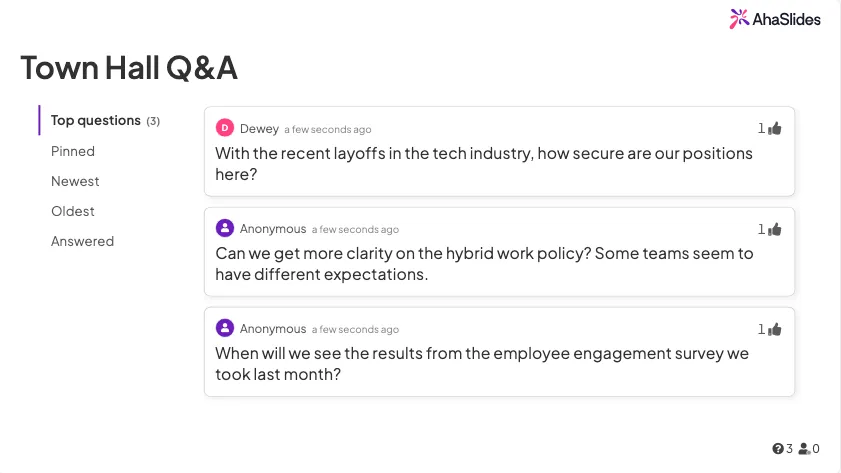
Digital tools transform how Q&A works. Instead of audiences raising hands, use a platform where people submit questions live. This approach has multiple benefits:
匿名: People ask bolder, more honest questions when their names aren't attached. They're less concerned about judgment.
組織: Technology lets you sort questions by theme or popularity. You can address the most relevant ones first.
無障礙: Virtual participants or people who feel shy about speaking up can still ask questions. You don't leave anyone out.
文檔: You capture questions for later follow-up. If you don't answer something during the session, you have it recorded and can respond afterward.
AhaSlides, Slido, and Mentimeter all offer simple question submission features. Display questions on screen as they come in. This transparency keeps everyone engaged, even those not asking. They see the quality of questions and answers in real-time.
If you're in a room without technology, use sticky notes. Ask the audience to write questions on cards and pass them to a moderator. This achieves similar benefits to digital submission.
5. Rephrase questions strategically
When someone asks a question, repeat it back before answering. This accomplishes three things:
First, it ensures everyone heard the question. In large rooms or with quiet speakers, not everyone catches the original query.
Second, it gives you a moment to think. Rephrasing the question buys you three to five seconds to organize your response. You won't have long awkward silences while you formulate answers.
Third, it lets you reframe the question if needed. If someone asks "Isn't your approach too expensive?" you might rephrase it as: "You're interested in the cost-benefit analysis of this approach." This reframing shifts the conversation toward substance and away from potential defensiveness.
Avoid rephrasing questions in yes-or-no format. Instead of "So you want to know if this works?" try "You're asking how this approach performs in practice." The second format invites a richer response.

6. Announce Q&A at the beginning
Tell your audience early that you'll have a Q&A session. Say: "At the end of my presentation, I'll spend 20 minutes answering your questions. Start thinking about what you want to know." This announcement makes people listen differently. They actively note questions as you present, rather than passively receiving information.
People also prepare better questions when they know they're coming. They think about what they don't understand or what they want to explore. The quality of questions improves significantly.
For longer presentations, you might announce multiple Q&A sessions. "We'll have a Q&A after the first section, then again at the end." This breaks up the presentation and prevents people from mentally checking out.
7. Enable follow-up conversations after the session
The Q&A session doesn't have to end when your time is up. Send a follow-up email within 24 hours thanking attendees and offering continued dialogue. Include a line like: "If additional questions came up after our session, feel free to reply to this email or contact me directly."
This approach serves multiple purposes. It reinforces key points from your presentation. It gives quieter audience members a chance to ask questions in a less public setting. And it keeps the conversation alive. You're not just delivering information and disappearing. You're building an ongoing relationship.
For large events, you might compile frequently asked questions and send answers to everyone. This multiplies the value of your session. People who didn't ask questions benefit from others' inquiries.
8. Recruit a moderator for larger events
Once you exceed 50 or so people, managing Q&A yourself becomes difficult. You're focused on answering while trying to track whose hands are up and keep things organized. It's overwhelming.
Assign a moderator, ideally someone who knows your topic reasonably well. Their job is to filter questions (ignoring spam or off-topic queries), categorize them by theme, and read them aloud if using written submissions. They also keep time, letting you know when you have two minutes left.
The moderator might also ask follow-up questions to clarify a person's original query. If someone asks vaguely, the moderator can dig deeper and make the question more useful for everyone.
This separation of duties takes pressure off you. You can focus entirely on giving great answers.
9. Permit anonymous question submission
We mentioned this earlier but it deserves emphasis. Anonymous questions are gold for engagement. People ask harder questions, reveal vulnerabilities, and explore topics they wouldn't mention publicly.
Use platforms that allow anonymous submission. Display the question on screen without the submitter's name. This protects privacy while letting everyone benefit from the inquiry.
Anonymous submissions also prevent social dynamics from limiting questions. If your boss or your competitor is in the room, you might hold back. Anonymity removes this barrier. The result is a richer, more honest Q&A session.
How to answer questions effectively
Pause before answering: Don't rush. Take a breath. Organize your thoughts for two or three seconds. This pause makes you seem thoughtful rather than defensive.
Answer directly: Address the question asked, not a different question you'd prefer to answer. If someone asks about cost, answer about cost. Don't pivot to features. If you don't know the answer, say so and commit to following up. That's far better than bluffing.
Keep answers concise: Aim for responses in the 30-second to two-minute range. Longer answers bore people. If a question requires deeper exploration, offer to discuss it afterward one-on-one rather than dominating the group's time.
Validate the question: Whether you agree with the premise or not, acknowledge that it's a good question. "That's a thoughtful point" or "I'm glad you raised that" shows respect for your audience.
Admit uncertainty: If you don't know, don't pretend. Audiences respect honesty. Try: "That's beyond my expertise, but I can connect you with someone who can help" or "I don't have that data in front of me, but I'll send it to you after the presentation."
Avoid defensive language: Words like "actually" or "well, what you said isn't quite right" create distance. Instead, say "That's interesting, and here's another perspective" or "You're right about X, and additionally..."
Handling difficult questions
Occasionally someone asks a challenging or confrontational question. Stay calm. Remember that the question, no matter how it's phrased, usually contains a valid concern underneath.
If someone seems angry, first acknowledge their emotion. "I hear your frustration" or "That's clearly important to you." Then address the substance. Separate the person's tone from their actual question. Don't match their tone. Staying composed demonstrates confidence and professionalism.
If someone asks something completely off-topic or inappropriate, you can redirect. "That's interesting but outside the scope of what we're discussing. Let's keep focused on..." This boundary-setting is professional and necessary.
If someone tries to debate you or won't accept your answer, you can offer a graceful exit. "We clearly view this differently, and that's okay. I'm happy to continue this conversation offline, but let's move on so others can ask questions."
Measuring Q&A effectiveness
After your presentation, ask a simple question on your feedback form: "How helpful was the Q&A session?" Even a yes/no answer gives you data. You'll quickly learn whether audiences value this time.
Also note which questions came up repeatedly. If three people asked the same thing, you know that topic deserves more emphasis in future presentations. This feedback loop improves your next session.
Pay attention to who asks questions. Are the same people always raising hands? If so, you might encourage quieter audience members with language like "Let's hear from someone new" or use anonymous submission to level the playing field.
Wrapping up your Q&A session
End clearly. Don't let the conversation just fade out. Try: "We're about out of time, so let me take one more question" or "Let me do a final round before we wrap." This signals closure and prevents people from feeling cut off mid-conversation.
Your closing statement should tie back to your main message. Remind the audience of your core point, reference something from the Q&A that reinforced it, and thank people for their engagement. Something like: "Your questions highlighted how this topic affects different industries differently, which is exactly why this approach matters. Thank you for the thoughtful discussion."
Finally, provide contact information. Encourage people to reach out if they have follow-up questions. Make it easy. A simple "email me at john@company.com or visit our website at..." gives people options.
Why Q&A sessions matter more than you think
In an age of recorded webinars and on-demand content, live Q&A sessions are increasingly valuable. They're where genuine human connection happens. They're where your audience feels seen and heard.
People remember interactions far longer than lectures. A conversation where someone's question was answered thoughtfully creates emotional memory. That memory builds loyalty and credibility in ways a polished presentation alone cannot.
By implementing these nine strategies, you transform Q&A from something you tolerate to something you welcome. Your confidence will grow. Your audience will engage more deeply. Your presentations will become more impactful.